Free training app

Your training.
Your progress.
One system.

Create a training plan, log your sessions and track progress. All currently available app features are free, without a paid app subscription.

  • Interactive live demo
  • No personal account required
  • Changes are not saved in demo mode
Try it yourselfNavigate and scroll directly inside the demo. Changes stay in this demo session.
Open a larger demo ↗Privacy

Product overview

From planning to your next cycle.

The Coach Cedric App is a currently free training app for strength training and muscle growth. It brings training plans, workout logging, progression and progress tracking together in one system. Choose flexible muscle growth training or a 5/3/1-based strength plan and follow changes in strength, training volume, body weight, body-fat percentage and measurements over time.

Choose a feature – the live demo next to it switches to the real area of the app.

Training plans

Two routes. One system.

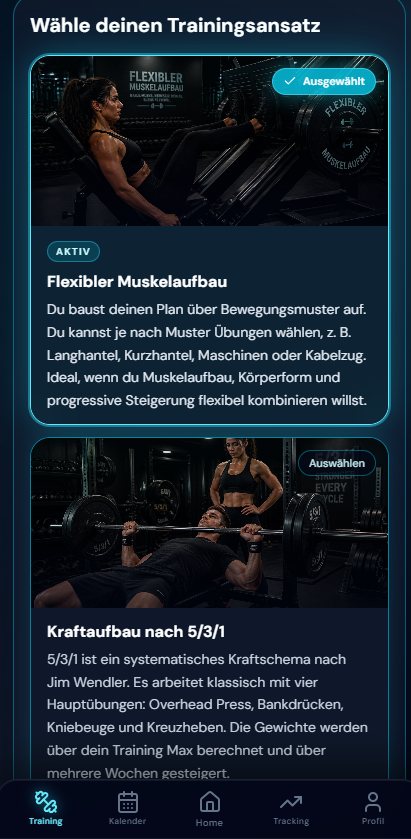
Choose the route that matches your goal: flexible muscle growth or strength with 5/3/1.

Flexible muscle growth

A plan that fits your training week.

Choose training days, focus, split and main exercises – the app turns them into a practical structure for muscle growth and progression.

  • 1–7 training days
  • Several split models
  • Choose your own main exercises

5/3/1 strength training

Four main lifts. Clear cycles.

Plan the four main lifts using a Training Max, three loading weeks and a deload. Assistance options complement the core plan.

  • Four main lifts
  • Training Max at 80/90/100%
  • Three weeks plus deload
How 5/3/1 works
Both routes start in the same plan setup
Coach Cedric App plan setup with flexible muscle growth and 5/3/1 strength training. Screenshot of the German interface.

Product screenshots show the German interface. Try the live demo in English.

View plan setup in the live demo

Then both run in the same app

  • Training
  • Calendar
  • Tracking
  • Analysis

Planning & training

A plan that works in real life.

Planning & training

Plan. Train. Progress.

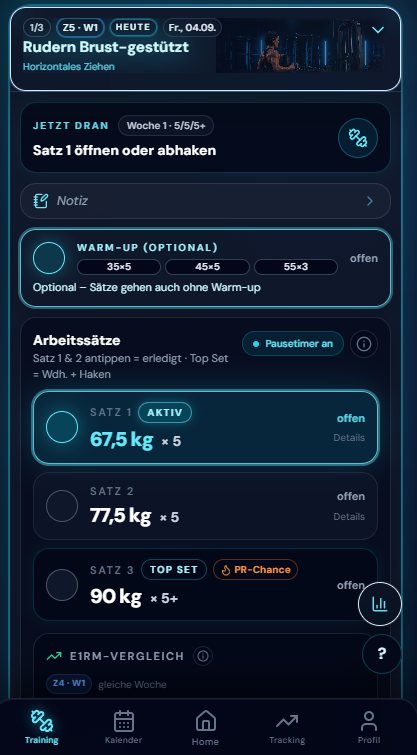
The Progression Builder turns your plan into a specific session. Log sets, weights, repetitions and RPE while you train.

  • Log sets, weights, repetitions and RPE
  • Compare e1RM, planned and completed values
  • Review standard or adaptive Training Max suggestions
  • Choose deloads and the next cycle deliberately
  • Use the rest timer during training
  • Log preloaded training sessions offline and sync later
Coach Cedric App workout view with working sets, weights, top set and rest timer. Screenshot of the German interface.

Calendar & free workouts

Your plan has to work in real life.

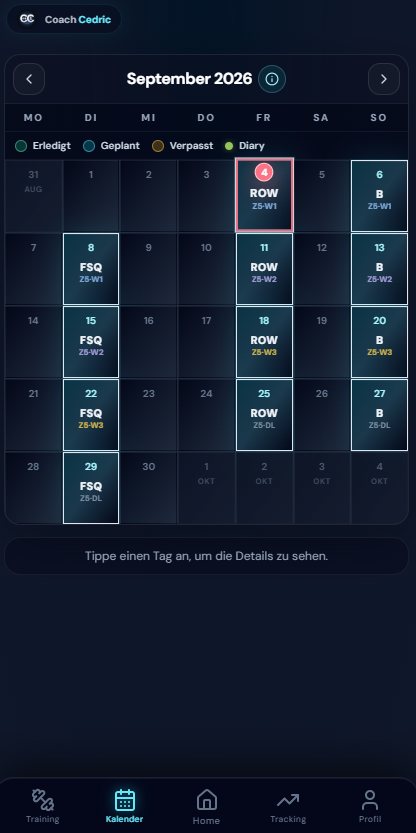
Planned, completed and missed sessions remain visible. Move, catch up on or intentionally skip workouts.

  • Move sessions in the calendar
  • Record breaks for holidays, recovery or illness
  • Log free gym and endurance workouts
  • Reuse previous gym workouts
  • Realign your training calendar after a break

Progress & analysis

See what your training changes.

Tracking & timeline

Progress you can see.

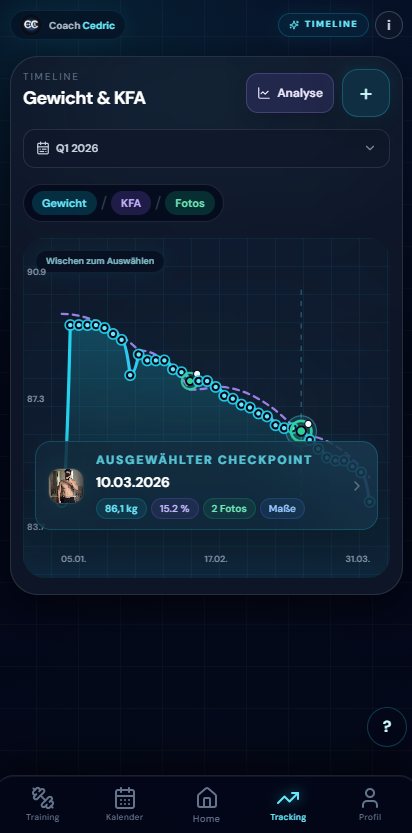
Body weight, body-fat percentage, measurements and photos come together in a timeline — from individual checkpoints to before-and-after comparisons.

  • Body weight and body-fat percentage over time
  • Measurements and change since your starting point
  • Photo checkpoints and before-and-after comparisons
  • Flexible periods and detail views
Coach Cedric App tracking timeline showing body weight and body-fat percentage. Screenshot of the German interface.

Strength & volume

Do not guess whether you are getting stronger. See it.

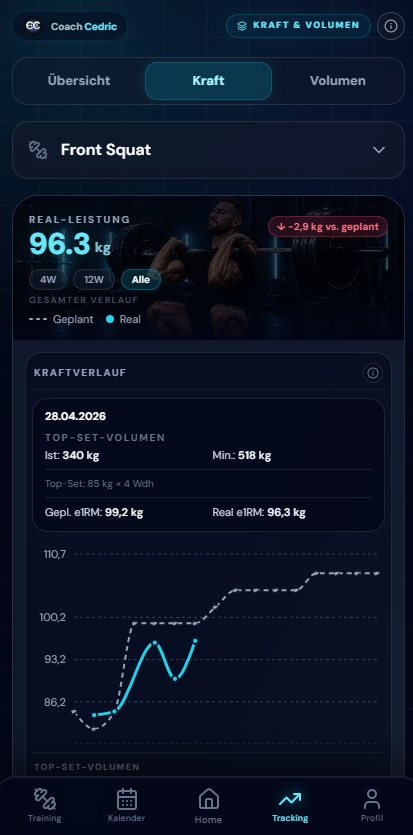
The analysis combines strength development, training volume and muscle-group distribution. Planned sessions and free gym workouts can be evaluated together.

  • e1RM and strength development
  • Planned versus completed values
  • Tonnage, set count and muscle distribution
  • Progression and free workouts in one analysis

Tracking Hub

Everything in one place.

One central hub leads to your timeline, measurements, records and analysis without leaving the app.

Coach Cedric App Tracking Hub with timeline, Protocol Diary, strength and volume, measurements and Progress Report. Screenshot of the German interface.

Tracking Hub

A central route to your timeline, measurements, strength & volume, Protocol Diary and reports.

Coach Cedric App body measurements view with measurement points and progress since the start. Screenshot of the German interface.

Body measurements

Record measurements, see trends and follow changes from your starting point.

Coach Cedric App Protocol Diary with recorded substances, amounts and times. Screenshot of the German interface.

Protocol Diary

Record supplements and substances with amount, time and notes — without medical advice.

Coach & devices

If you want support, you do not have to train alone.

Use the app independently or add a coach when you want support. You decide which areas a coach can see. The reviewed coach interface is designed as a read-only view.

  • Choose individual areas to share with a coach
  • Adjust access at any time
  • Withdraw access
  • Coach view without editing in the reviewed interface

Wherever you train.

Use the Coach Cedric App in a browser on your phone, tablet, laptop or desktop computer. Your account-based training and tracking data is available centrally.

  • Smartphone
  • Tablet
  • Laptop
  • Desktop

Your app. Your settings.

  • German or English
  • kg or lb
  • cm or in
  • Profile and profile picture
  • Default rest timer

Tools → App

A tool gets you started. The app is the long-term system.

Frequently asked questions

The essentials.

Is the Coach Cedric App free?

Yes. The app is currently free. All currently available app features can be used without a paid app subscription. Personal coaching is a separate service.

Can I use the app offline?

Yes. After loading your data in the signed-in app, you can use preloaded training sessions and supported tracking data offline and record changes locally. These sync later when you have an internet connection; you review any conflicts in the app. Not every feature works offline: viewing or uploading photos, creating or replacing plans, and certain account and server features require internet access.

What is the Coach Cedric App?

The Coach Cedric App is a training app for strength training and muscle growth. It combines training plans, workout logging, a calendar, progression and progress analysis in one system.

Can I create a 5/3/1 training plan?

Yes. Plan the four main lifts using your Training Max, three loading weeks and a deload. Assistance options complement the core plan.

Can I create a muscle-growth training plan?

Yes. The flexible muscle-growth plan is based on your training frequency, focus, split and the main exercises you choose.

Which progress data can I track?

This includes body weight, body-fat percentage, measurements, photos, strength values including e1RM, training volume, and planned and free workouts.

How do progression and the Training Max work?

The Training Max is the calculation base for your working sets. The app either progresses it using the standard method or suggests an adjustment based on your logged top sets, which you confirm yourself.

Can I log free workouts in addition to my plan?

Yes. Free gym and endurance workouts can be logged separately, previous gym workouts can be reused, and all of them can be analysed alongside planned sessions.

Does the app work on phones, tablets, laptops and desktop computers?

Yes. The responsive browser interface works on all four. Your account data syncs online; preloaded training and supported tracking data can also be used offline.

Can I share data with a coach?

Optionally. You choose individual areas and can adjust or withdraw access at any time. The reviewed coach interface is a read-only view.


Coach Cedric App

Your next session begins with a clear system.

Coach Cedric App workout view with working sets, weights, top set and rest timer. Screenshot of the German interface.
Coach Cedric App strength and volume analysis with development and planned-versus-completed values. Screenshot of the German interface.

Real app views · German interface